
DeepSpeed ZeRO Optimization Stages: A Comprehensive Analysis
Training large-scale AI models demands immense computational power and memory resources, which can be challenging to manage efficiently.

DeepSpeed ZeRO Optimization Stages: A Comprehensive Analysis
-
Training large-scale AI models demands immense computational power and memory resources, which can be challenging to manage efficiently.
-
Developed by Microsoft, DeepSpeed is an open-source library that optimizes large model training by significantly reducing memory usage and improving performance.
-
At the heart of DeepSpeed is the Zero Redundancy Optimizer (ZeRO), which offers three distinct optimization stages—Stage 1, Stage 2, and Stage 3—each designed to address specific training challenges.
ZeRO Stage 1: Optimizer State Partitioning
ZeRO Stage 1 optimizes memory usage by partitioning optimizer states across devices during training. Instead of each device storing a full copy of the optimizer data, the data is split so each device holds only a portion, which reduces overall memory consumption.
This stage is easy to implement, making it suitable for beginners. It lowers memory use by evenly distributing optimizer states and can potentially speed up training due to reduced memory load per device. However, activation and gradient memory are not partitioned, which limits scalability. Therefore, memory savings are moderate compared to later stages.
ZeRO Stage 1 works well as a starting point for simpler tasks or when memory constraints are present but not severe. Its low complexity makes it a practical option for many standard training scenarios.
ZeRO Stage 2: Gradient and Optimizer State Partitioning
ZeRO Stage 2 builds on the benefits of Stage 1 by partitioning both gradients and optimizer states across devices.
This approach achieves greater memory efficiency and enables the training of significantly larger models. Compared to Stage 1, Stage 2 offers improved memory savings and better scalability by allowing large models to be trained across more devices in parallel. It balances memory efficiency with training speed, ensuring performance is not significantly impacted. However, Stage 2 comes with increased complexity, requiring a more advanced setup and configuration.
Activation memory still remains a limiting factor for extremely large models. This stage is recommended for scalable training of models that need more memory-efficient solutions and is suitable for complex training scenarios that require fine-grained control.
ZeRO Stage 3: Parameter, Gradient, and Optimizer State Partitioning
ZeRO Stage 3 delivers maximum memory efficiency by fully partitioning model parameters, gradients, and optimizer states across devices.
This approach allows the training of extremely large models that would otherwise be limited by hardware memory constraints. It greatly reduces memory load, making ultra-large model training feasible, and removes size limitations imposed by device memory. Stage 3 is especially effective for scaling massive model architectures. However, it comes with high implementation complexity, making configuration and deployment significantly more challenging. Additionally, increased communication overhead due to more device-to-device exchanges may slow down training.
Achieving optimal performance requires careful and meticulous parameter tuning. This stage is specifically designed for large-scale model training and is ideal in environments where device memory is a critical bottleneck.
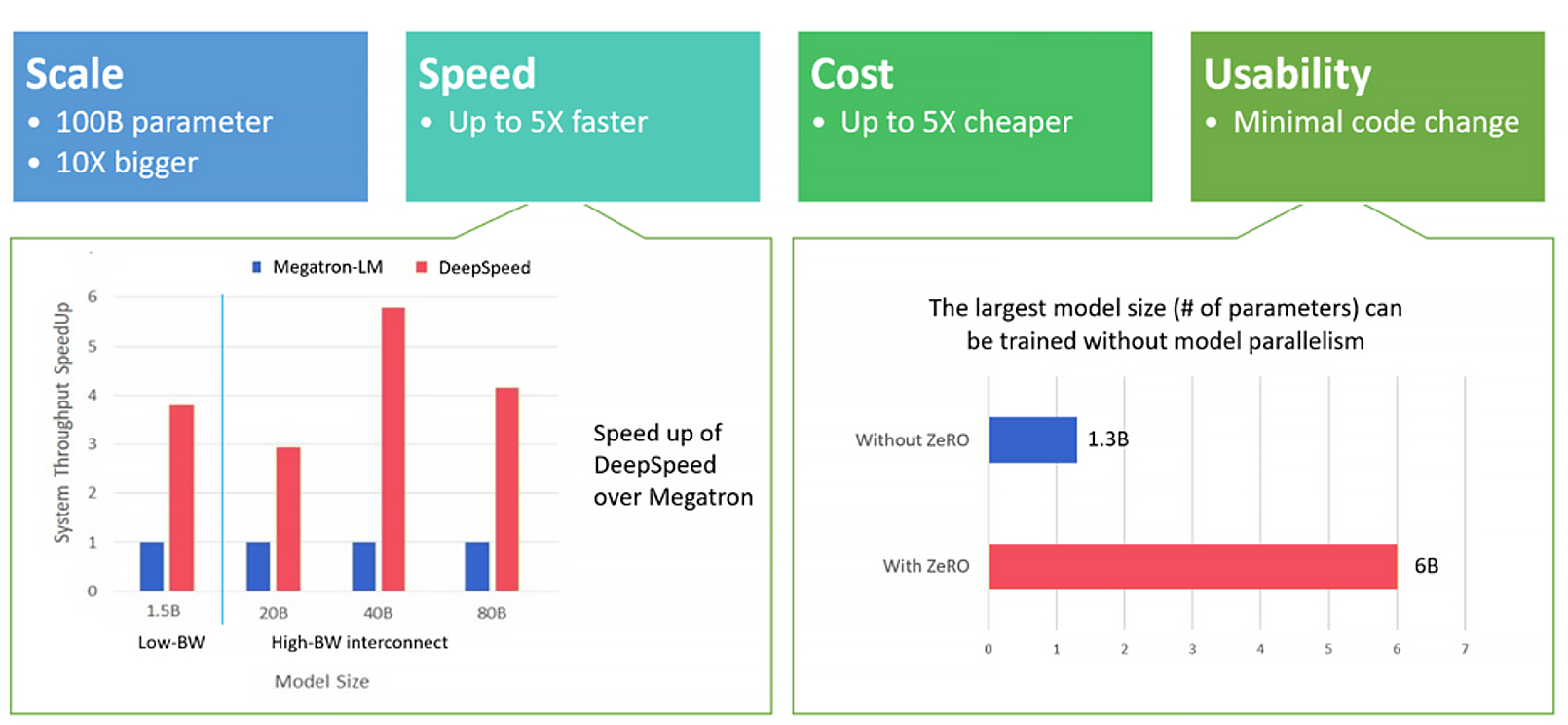
Application Scenarios: Impact of ZeRO Stages on Memory Usage
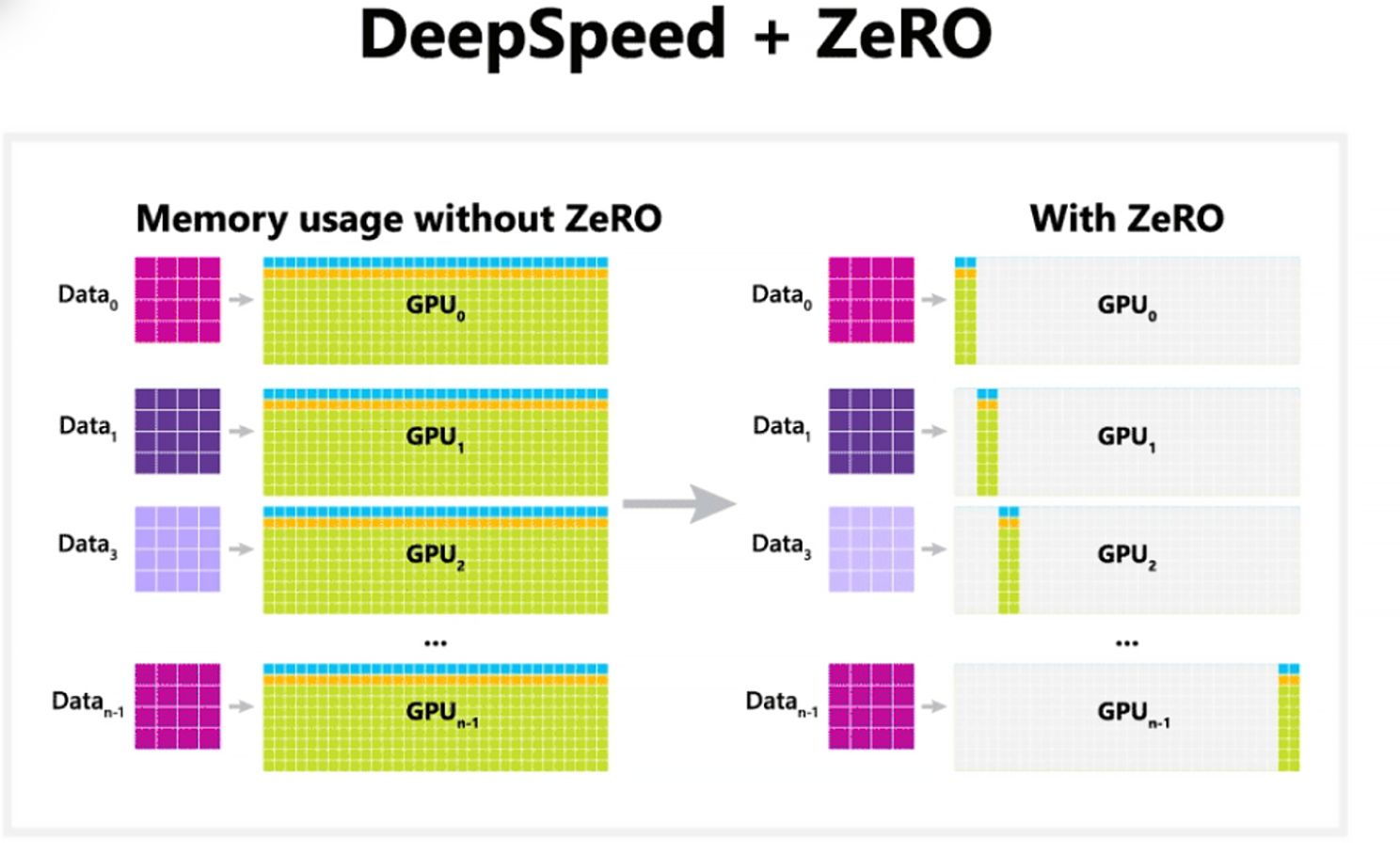
Scenario 1: ZeRO Stage 1 - Optimizer State Partitioning
When using ZeRO Stage 1, only the optimizer states, such as Adam's moment values, are partitioned across devices. Model parameters and gradients, however, remain fully replicated on all GPUs. For example, with 4 GPUs, each GPU holds only one-quarter of the optimizer states, but all GPUs store complete copies of the model parameters and gradients.
In terms of memory usage per GPU, model parameters take up 4 GB, gradients use 4 GB, and optimizer states occupy 1 GB, totaling 9 GB of memory per GPU.
Scenario 2: ZeRO Stage 2 - Gradient Partitioning
In ZeRO Stage 2, both optimizer states and gradients are partitioned across devices, while model parameters remain fully replicated. For example, with 4 GPUs, each GPU stores one-quarter of the optimizer states and one-quarter of the gradients, but keeps a full copy of the model parameters.
The memory usage per GPU includes 4 GB for model parameters, 1 GB for gradients, and 1 GB for optimizer states, totaling 6 GB. This setup reduces memory usage down to approximately 5 GB per GPU.
Scenario 3: ZeRO Stage 3 - Parameter Partitioning
ZeRO Stage 3 partitions all major components—model parameters, gradients, and optimizer states—so that no component is fully replicated on any single device. For example, with 4 GPUs, each GPU stores only one-quarter of the parameters, gradients, and optimizer states.
The memory usage per GPU includes 1 GB for model parameters, 1 GB for gradients, and 1 GB for optimizer states, totaling 3 GB of memory.
Comparison of ZeRO Optimization Stages
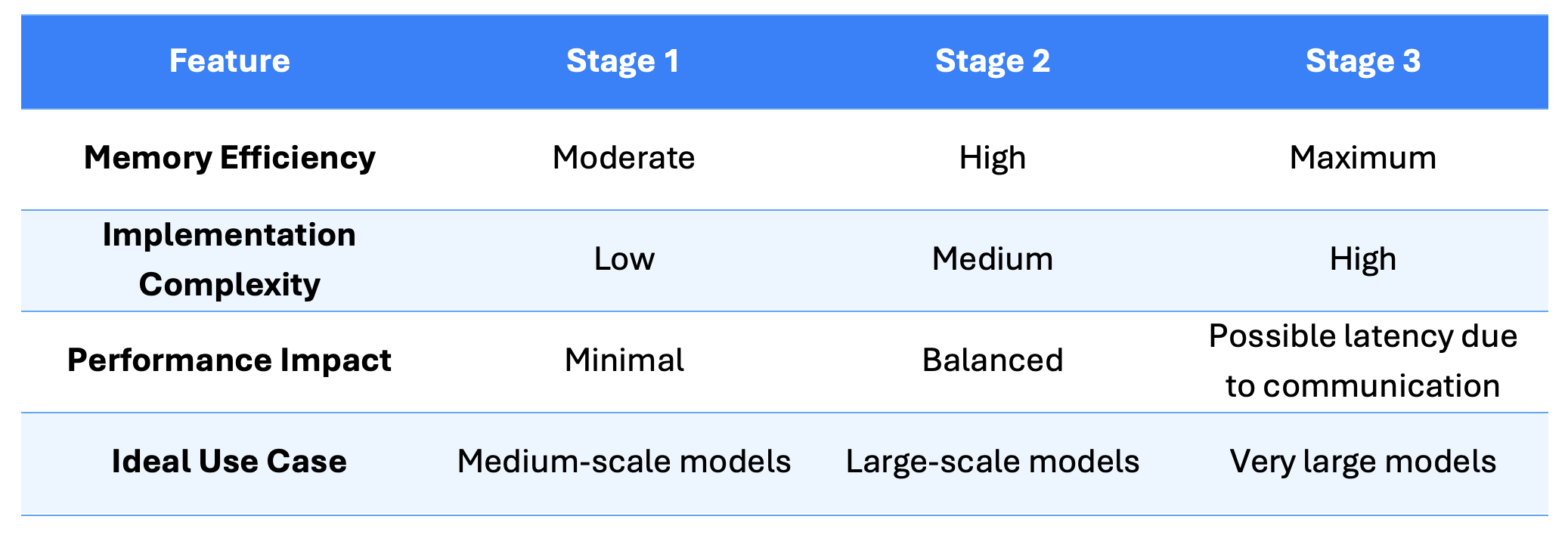
This comparison table is designed to help users quickly assess which ZeRO stage best suits their training needs. As memory efficiency increases, so does the complexity of implementation—so factors like model size, available hardware, and required performance must be weighed together.
DeepSpeed Training Parameters
DeepSpeed offers a variety of configuration parameters to fine-tune and optimize the training process, especially for large-scale distributed systems.
Below is a list of the most important parameters used in the NewMind Distributed Fine-Tuning Pipeline, along with descriptions, use cases, and recommended values:
gradient_accumulation_steps
Defines how many forward/backward passes to accumulate before performing an optimizer update. This lets you simulate larger batch sizes by summing gradients over multiple smaller “micro-batches,” which is handy when your desired batch size exceeds GPU memory. In practice, you’ll often pick a value between 4 and 16 depending on how much memory headroom you have.
zero_optimization
Enables DeepSpeed’s ZeRO optimizer and lets you choose a reduction stage (1, 2, or 3) to slash memory footprint and communication overhead during training. Stage 2 is a popular sweet spot for large models—it delivers substantial memory savings without the full complexity of stage 3—so it’s usually the recommended starting point.
Fp16
Turns on 16-bit floating-point precision for model weights and computations, halving memory usage and often boosting throughput on compatible hardware. This is especially effective on modern NVIDIA GPUs, so setting “fp16=True” is generally advised to speed up training while retaining acceptable numerical stability.
offload_optimizer_device and offload_param_device
These settings determine where to offload optimizer states and model parameters—either to the CPU, NVMe, or not at all—to alleviate GPU memory pressure. They’re invaluable when your GPU can’t hold the full model or optimizer state in memory, allowing you to trade some CPU or disk I/O for reduced VRAM usage. In most cases, offloading to CPU strikes the best balance, though you can disable offloading (none) if you have ample GPU memory or NVMe is too slow.
Bf16
Enabling bfloat16 mixed-precision training lets you store weights and perform compute in a 16-bit format with an 8-bit exponent, offering better numerical stability than fp16 and similar memory savings. This is particularly beneficial on hardware (TPUs, newer NVIDIA GPUs) that natively support bfloat16, reducing memory footprint and sometimes improving convergence. We generally recommend setting bf16=true on compatible accelerators.
zero3_init_flag and zero3_save_16bit_model
These flags control how ZeRO Stage 3 initializes parameters (in full or 16-bit) and whether to save the final model in 16-bit to further shrink checkpoint size. They’re crucial for training and persisting extremely large models that would otherwise exceed storage or memory limits. When using ZeRO 3, you’ll usually set both flags to true to minimize memory usage during init and produce compact 16-bit checkpoints.
distributed_type
This parameter selects the overarching distributed training backend—options include DEEPSPEED, MPI, NCCL, etc.—and dictates how processes coordinate, shard data, and communicate gradients. Choosing the right framework affects performance, fault tolerance, and feature availability. For tight DeepSpeed integration and advanced memory optimizations, distributed_type=DEEPSPEED is the go-to choice.
num_machines and num_processes
These settings specify the scale of your training cluster: num_machines is the number of physical nodes, and num_processes is the total training processes (often one per GPU) launched across them. They enable you to configure single-node or multi-node, multi-GPU runs. A common baseline is num_machines=1 with num_processes=2 (for two GPUs), scaling both up as you add more hardware.
Impact of ZeRO Stages on Training Loss
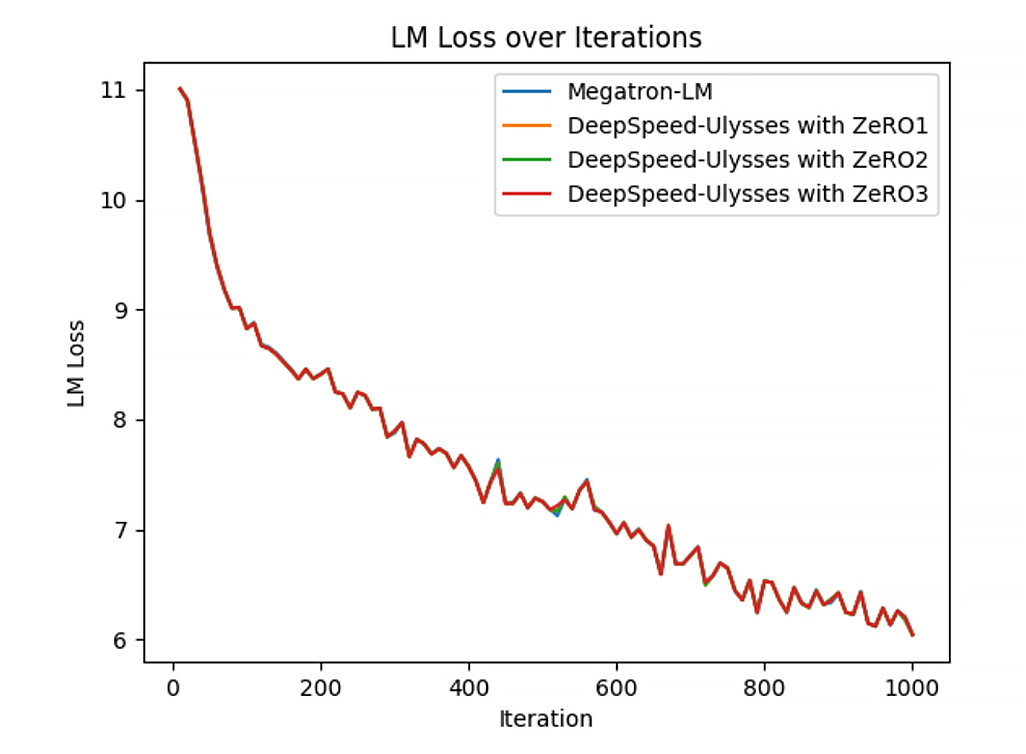
As shown in Figure 3, applying ZeRO Stage 1, 2, or 3 has no significant impact on the training loss. This indicates that ZeRO optimizations are designed to improve memory efficiency and scalability without altering the model's learning behavior. In other words, different ZeRO stages yield similar loss curves when training on the same model and dataset.
Our Take
DeepSpeed’s ZeRO optimization offers a strategic, scalable approach to memory-constrained large model training, with increasing implementation complexity unlocking larger model capabilities. Stage 1 is an easy entry point with moderate memory savings, ideal for standard scenarios. Stage 2 balances memory efficiency and complexity by partitioning gradients and optimizer states, suitable for most production environments. Stage 3 enables ultra-large model training through full parameter partitioning but requires careful configuration.
Importantly, ZeRO preserves consistent training loss across stages, letting users choose optimization based on resources without sacrificing model quality. Success depends on evaluating model size, hardware limits, and complexity tolerance. DeepSpeed’s flexible configuration allows teams to efficiently scale training while maintaining convergence stability.
Key Takeaways
-
DeepSpeed's ZeRO optimizer significantly reduces memory usage, enabling efficient large-scale AI model training
-
ZeRO Stage 1 partitions optimizer states, offering moderate memory savings with low implementation complexity—ideal for simpler tasks
-
ZeRO Stage 2 partitions both optimizer states and gradients, improving memory efficiency and scalability for larger models but requiring more advanced setup
-
ZeRO Stage 3 fully partitions model parameters, gradients, and optimizer states, achieving maximum memory efficiency for ultra-large models, though with higher complexity and communication overhead
-
Choosing the right ZeRO stage depends on model size, hardware resources, and desired training performance
-
DeepSpeed provides configurable parameters like gradient accumulation steps and offloading options to fine-tune training for available hardware
-
ZeRO optimizations do not negatively impact training loss, maintaining model learning behavior while improving scalability
-
Careful configuration and tuning are essential for maximizing performance, especially in complex setups like ZeRO Stage 3
References
-
Titu, A., Narayanan, D., Shoeybi, M., Patwary, M., LeGresley, P., Rasley, J., & Rajbhandari, S. (2021). ZeRO & DeepSpeed: New system optimizations enable training models with over 100 billion parameters. Microsoft Research Blog. Available at: https://www.microsoft.com/en-us/research/blog/zero-deepspeed-new-system-optimizations-enable-training-models-with-over-100-billion-parameters/
-
Jacobs, S. A., Tanaka, M., Zhang, C., Zhang, M., Song, S. L., Rajbhandari, S., & He, Y. (2023). DeepSpeed Ulysses: System Optimizations for Enabling Training of Extreme Long Sequence Transformer Models. arXiv preprint, arXiv:2309.14509v2 [cs.LG]. Available at: https://arxiv.org/abs/2309.14509